
Site Audit Pro
Veam Studios LtdProductivity
4.190.00 Reviews
- Version
- 3.2.28
- Installs
- 100.00K
- Age Rating
- Everyone
Screenshots
Our Review of Site Audit Pro
 Analysis by Appyee
When several people share a tablet or phone on a busy job, an inspection can quickly become a jumble of photos, notes and half-remembered conversations. I find Site Audit Pro most useful when one person is responsible for turning what the team sees into a clear record: capture an issue while standing beside it, then prepare a report that others can review. That makes it a practical tool for a small crew coordinating work, rather than a general-purpose household checklist.
One device, several people, clear ownership
A shared device can make fieldwork convenient, but it also makes responsibility important. Before passing a phone around, agree on who is entering the audit and who will check the finished report. That simple habit helps prevent one person’s observations from being mistaken for another’s, especially when several issues look similar or are found in different parts of a site.
I would treat the app as the place to record inspection findings, not as a substitute for agreeing how the team communicates. A photo and a written note are useful evidence, but people still need to decide who will follow up and when. If you are lending the device to a colleague, make sure they know which project they are working in before they add anything; a quick project check is easier than sorting out mixed records later.
Build a repeatable inspection routine
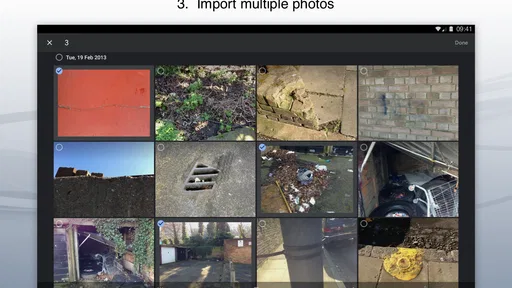
For recurring checks, I would begin by settling on a consistent way to describe common issues. A useful note says where the problem is, what can be seen, and what needs attention, rather than relying on a label that only makes sense to the person who entered it. Photos are strongest when they show enough surroundings to identify the location as well as the detail of the issue. Taking a close shot and a wider context shot, when appropriate, can save a follow-up walk just to work out where the picture was taken.
Templates can help a team keep repeated audits consistent, but they are most valuable when they reflect the actual inspection rather than trying to cover every possible situation. I would keep a template focused on the checks people genuinely use, then adjust it as the work changes. An overly broad template can slow down a quick inspection and encourage people to fill fields mechanically; a focused one makes omissions easier to notice.
There is also a useful distinction between recording an observation and deciding what it means. A photo can show a visible condition, while a concise note can explain why the team should care or what needs checking next. Keeping those two things clear makes a report more useful to someone who was not present. It is a small discipline, but it reduces the risk of a recipient having to call the inspector just to interpret a picture.
Getting Started with Site Audit Pro
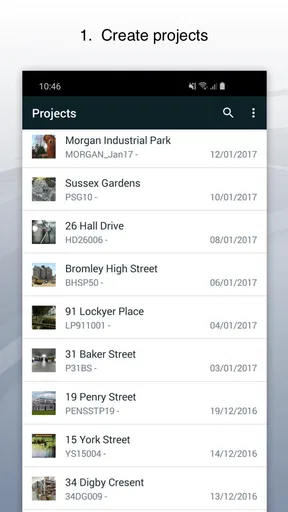
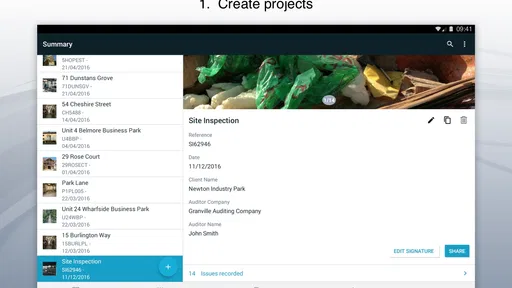
First off, downloading and installing Site Audit Pro is a breeze. Available on both Android and iOS, the app's user-friendly interface welcomes you with open arms. Right from the get-go, you’ll notice how intuitive everything is. Setting up your first project takes just a few clicks. You simply enter the project details and voilà—you're ready to start auditing.
Feature Highlights
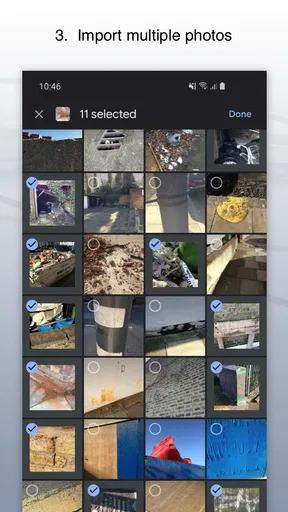
The app is packed with features that can transform how you handle site audits. One of my favorite aspects is the customizable templates. You can create templates to suit various types of projects, which saves a ton of time in the long run. Plus, the ability to add photos directly to your reports? Absolute game-changer! You can snap a picture of an issue, annotate it, and attach it to your report all within the app.
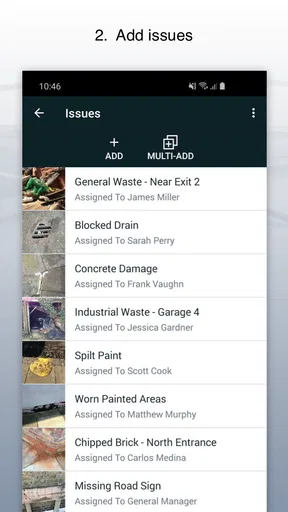
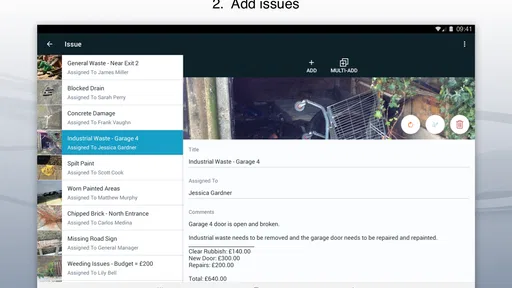
The app also features a straightforward way to assign tasks. Once you've identified an issue, you can delegate it to a team member directly from the app. This keeps everyone on the same page and ensures that nothing falls through the cracks.
Use it where the work happens
For a realistic day-to-day example, imagine walking a site with a colleague before work moves on to the next stage. You notice a condition that needs attention, record it while you are there, and capture a photo that makes the concern easy to understand. Later, rather than trying to reconstruct the inspection from scattered camera images and messages, you can prepare a report from the audit record and share it with the people who need to act.
The value is not just fewer steps. A report created close to the inspection is less dependent on memory, and an image tied to a specific finding is easier to discuss than a photo sent without context. I would still take care to review the report before sharing it: check that the right project is selected, the wording is clear to someone outside the inspection, and each image supports the point it accompanies.
That workflow suits inspectors, contractors and project managers who need a portable record of observed issues. It is less compelling for someone who only wants a personal to-do list or a family maintenance log. Those needs are usually better served by a basic checklist or notes app, where a full audit-and-report process may add unnecessary steps.
User Experience
Using Site Audit Pro is like having a personal assistant in your pocket. The interface is clean, and navigation is a breeze. It’s evident that a lot of thought went into the app’s design to make sure it caters to its core audience—people who are often on the go.
One thing I’ve noticed is how the app doesn’t lag, even with multiple projects and images loaded. It’s optimized to handle a lot without compromising performance, which is crucial when you’re out in the field.
Coordination without confusion
When tasks are delegated, a team still needs a shared understanding of what “done” means. I recommend writing a specific next step in the finding rather than assuming that a teammate will infer it from a photo. If the issue needs another inspection, say what should be checked; if it needs a repair, make the requested action plain. This gives the person receiving the assignment a better starting point and makes later review more meaningful.
For teams using one device in rotation, a handoff routine matters as much as the app itself. The person finishing an inspection can review the current project and report before the next person begins. That is especially helpful on a shared tablet kept in a site office, where several workers may use it at different times. I would not assume that device sharing automatically creates separate personal workspaces or establishes who made each entry; the team should agree on its own record-keeping habits.
Compared with the usual mix of paper forms, camera-roll photos and email, the main advantage here is keeping observations and report preparation in one audit-focused workflow. Paper can be easier when a crew wants to sketch freely or work without handling a device, while a general notes app may be quicker for a single informal observation. The trade-off is that those alternatives often leave someone to assemble a coherent report later. This app makes more sense when that report is part of the job, not an occasional extra.
The Real Game Changer: Report Generation
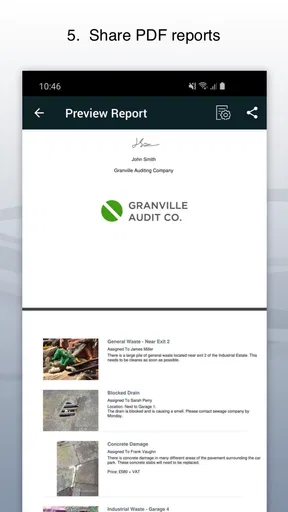
Now, let’s talk about one of the most impressive features—report generation. Say goodbye to spending hours formatting and compiling reports. With this app, reports are generated in just a few taps. You can export them in PDF format, which is perfect for sharing with clients or stakeholders. The reports are professional-looking and include all the details you’ve entered, along with photos and annotations.
Before sending a PDF outside the team, I would read it as if I had never visited the site. Can I tell what each issue is, where it was observed, and what the image is meant to show? That final pass is a practical safeguard against ambiguous notes and photos that made sense in the moment but not on a recipient’s screen. If a report is going to a client or another stakeholder, clarity is more valuable than squeezing in every detail the inspector remembers.
A report is also a snapshot of what has been entered, so I would not treat exporting as proof that a task has been completed. The inspection record and the follow-up work are different parts of the process. Teams should decide how they will confirm resolution and keep that step visible in their normal coordination routine rather than assuming that sharing a document closes the loop.
Who should use it, and who may prefer something simpler
Veam Studios Ltd makes this productivity app for people who need to document site conditions and turn their observations into reports. Its audience is specific: a working inspector, contractor or project lead is more likely to benefit than someone seeking a broad project-management suite. With an average rating of 4.1 from around 749 ratings and over 100,000 installs, it has found a real audience, though those figures alone cannot tell you whether its workflow matches your own.
The app costs $12.90, so I would weigh that against how often you carry out inspections and how much time your current reporting process takes. If reports are routine and photos need to stay attached to documented findings, paying for a dedicated tool may be worthwhile. If you only record an occasional defect, a simple form, notebook or general-purpose notes app may be enough. The decision is less about feature count than whether a focused audit workflow solves a recurring problem for you.
Age, trust and device boundaries
The app is rated for Everyone, but its practical audience is defined by the work being documented rather than by age alone. On a shared family device, I would keep work projects separate from casual personal use by agreeing who may open and edit the audit records. That is a sensible boundary for any tool containing project observations or client-facing material; a general age label should not be mistaken for a promise about account separation or family controls.
The current version is 3.2.28, and it runs on operating systems from version 6.0 onward. I would check that a work phone or shared tablet meets that minimum before planning to rely on it during an inspection. The app was released on Oct 14, 2014, and its long presence does not remove the need to test the workflow on the actual device and with the team’s usual reporting routine.
Why It’s Worth It
In a world where time is money, Site Audit Pro ensures that you’re spending your time wisely. By automating many of the tedious parts of site audits, it allows you to focus on what really matters—getting the job done right. The app not only enhances productivity but also improves communication and accountability among team members.
Whether you’re a project manager, inspector, or a contractor, this app can drastically simplify your workflow. Trust me, once you start using it, you'll wonder how you ever managed without it.
So, if you’re looking to up your game in site management and audits, give Site Audit Pro a whirl. It’s a small investment for a massive return in efficiency and peace of mind. I promise you won’t regret it!
My household verdict
For a household sharing a device, I would use this only when someone genuinely needs to carry out site audits; it is not a replacement for a shared shopping list or home chore planner. On a team device, the strongest approach is to agree on project selection, note style, handoffs and who reviews a PDF before it leaves the group. Those habits make its audit and reporting tools more dependable without expecting the app to solve every coordination question.
My recommendation is straightforward: choose it if inspections are part of your work and you want findings, photos and reports to follow a more organized path. Skip it if your needs are occasional, informal or mainly about coordinating family tasks. For regular field audits, its focused approach is appealing; for everything else, a simpler tool is likely to feel lighter and be easier to share.
Verdict
Strengths of Site Audit Pro
- User-friendly interface with intuitive navigation.
- Generates professional PDF audit reports.
- Supports adding photos to audits easily.
- Customizable templates for tailored reports.
- Offline functionality for audits in remote areas.
Limitations of Site Audit Pro
- Limited free version features available.
- Occasional syncing issues on some devices.
- No real-time collaboration feature.
- Lacks integration with some third-party tools.
- Higher subscription cost compared to competitors.
Similar Picks in This Category
View All
Google Calendar
Google LLC4.6

Google Drive
Google LLC4.3

Google Assistant
Google LLC3.9

Microsoft OneDrive
Microsoft Corporation4.6

Samsung Calendar
Samsung Electronics Co., Ltd.4.1

Microsoft OneNote: Save Notes
Microsoft Corporation4.6
Frequently Asked Questions
What is Site Audit Pro and how does it work?
Site Audit Pro is an app designed to streamline the process of auditing construction sites. Users can create detailed audits by capturing photos, making notes, and annotating images directly within the app. It simplifies reporting by allowing users to generate professional PDF reports that can be shared with team members or clients.
Is Site Audit Pro available on both Android and iOS devices?
Yes, Site Audit Pro is available for download on both Android and iOS platforms. This ensures that users can access its features regardless of their device preference, making it a versatile tool for construction professionals who require flexibility in their work environments.
Can I customize the reports generated by Site Audit Pro?
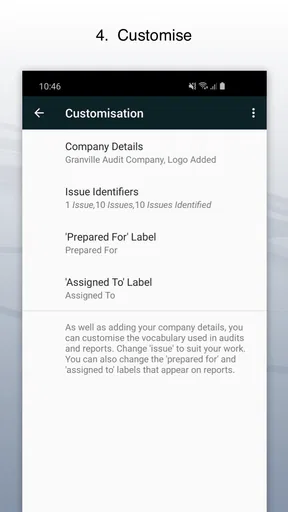
Absolutely. Site Audit Pro offers customization options for reports, allowing users to include their company logo, set report titles, and choose from different templates. This personalization ensures that the reports are not only comprehensive but also aligned with the branding and professional standards of your organization.
Does Site Audit Pro support collaboration among team members?
Yes, Site Audit Pro supports collaboration by allowing users to share reports and audit findings easily with team members and stakeholders. This feature ensures that everyone involved in a project remains informed and can contribute to the auditing process, enhancing overall productivity and communication.
Is there a learning curve to using Site Audit Pro?
Site Audit Pro is designed with user-friendliness in mind, featuring an intuitive interface that minimizes the learning curve. Most users find it easy to navigate and start creating audits quickly. Additionally, there are tutorials and support available to assist new users in getting started and maximizing the app's potential.
